%20(500%20x%20162%20px)(1).png)
Lab Introduction
Overview
Welcome to the Delivering Value with Keyfactor Lab! Our lab environment is provided by CloudShare.
The lab lessons located throughout these courses will build on each other. When beginning the lab, you are starting with a blank environment with no Keyfactor software installed. The following items have been pre-configured to speed up the installation of the Keyfactor Command components.
Domain Controller
DNS
Microsoft Active Directory Certificate Services
IIS Web Server
Microsoft SQL Server
In your first lab you will step through the installation process for the Management Portal, The Command Service, and the Keyfactor API. These items will serve as the basis for the remaining lab components. Art the end of this learning path, your lab environment will have the following logical architecture:
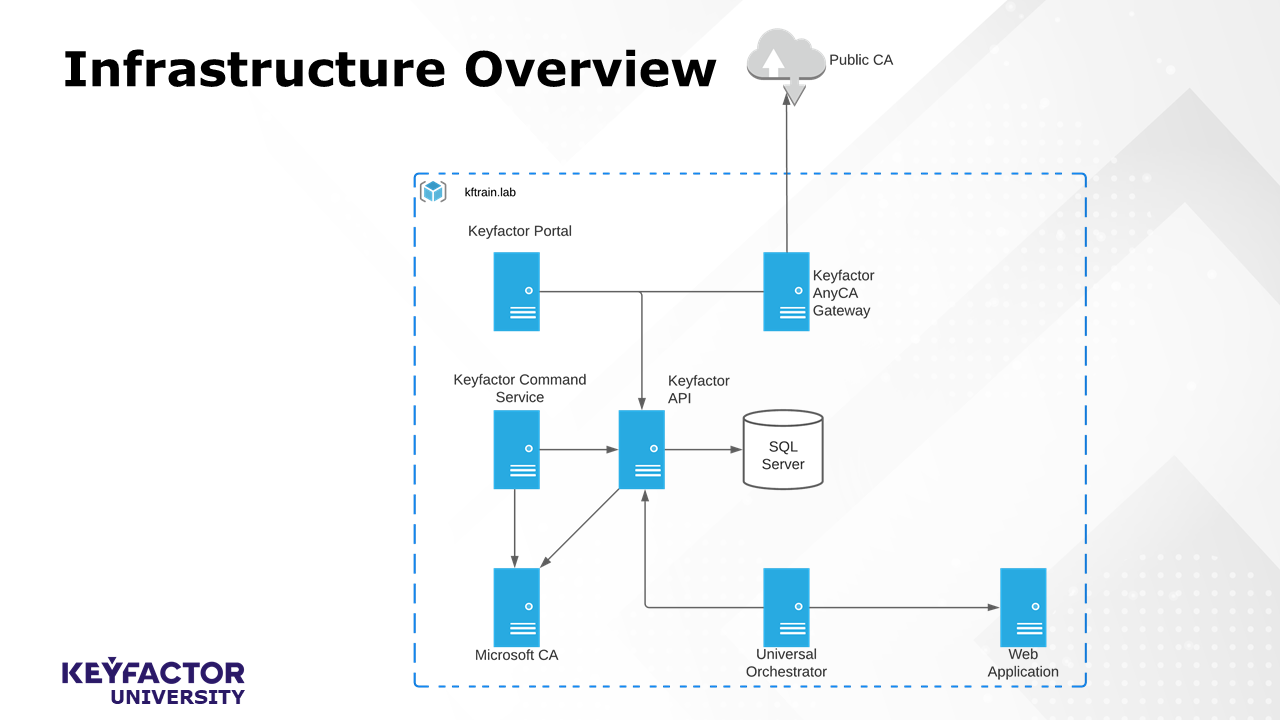
Logical Component Diagram for Lab Environment
Lab Environment Configurations
The following configurations have been completed in your lab environment. These configurations can be completed prior to installation to minimize the warnings displayed throughout the configuration process.
TLS
Our server has already been issued a certificate for the keyfactor.kftrain.lab hostname. When stepping through the wizard, there are a number of configuration options that reference the expected Keyfactor URLs. This will help alleviate some warnings associated with untrusted/unsecured communications detected during configuration.
Root Cert
Our Root CA certificate has been added to the trusted roots store. This will be required of any client that plans to connect to the Keyfactor Portal if your server uses a private CA.
Kerberos
In order to properly use kerberos authentication with Keyfactor, we need to set a Service Principal Name (SPN) for our Keyfactor service account. We've already completed this step in the lab, but for reference the command is:
setspn –s HTTP/keyfactor.domain.com DOMAIN\svc_keyfactorpoolWhere "keyfactor.domain.com" is the Keyfactor Command Server hostname/DNS alias and DOMAIN\svc_keyfactorpool is the service account used to run the application. The setspn command is installed on servers with the Domain Services role and requires elevated privileges to execute.
Constrained Delegation
This configuration indicates to the CA that it can trust credentials presented by the Keyfactor Service when those credentials are not those of the service account. This is required if any enrollment or management functions will be performed on a Microsoft CA from within the Keyfactor portal. This is done using PowerShell and will set an AD Group as the source of service accounts that are allowed to delegate accounts to the CA.
$mygroup = Get-ADGroup -Identity KerberosDelegationGroup
Set-ADComputer IssuingCA -PrincipalsAllowedToDelegateToAccount $mygroup
Where "KerberosDelegationGroup" is the AD Group created for this purpose and "IssuingCA" is the hostname of the CA. This command needs to be run once for each CA that needs to trust the delegations done by Keyfactor.
Let's get started by installing our core components. If you encounter any issues, please email training@keyfactor.com.