%20(500%20x%20162%20px)(1).png)
CMP
The following sections describe how to create a Certificate Management Protocol (CMP) alias and using the CMP client:
Introduction

Integration - Certificate management protocol (CMP)
Slide Deck: Integration
Overview: This lab demonstrates using CMP to generate an entry and certificate at the same time a.k.a. RA Mode.
This lab uses an existing end entity profile called TLSClientEndEntityProfile. CMP client software will be used to contact the CMP ALIAS (endpoint), to request the entry and certificate be generated by EJBCA at the same time, using the CMP protocol.
Slide Reference
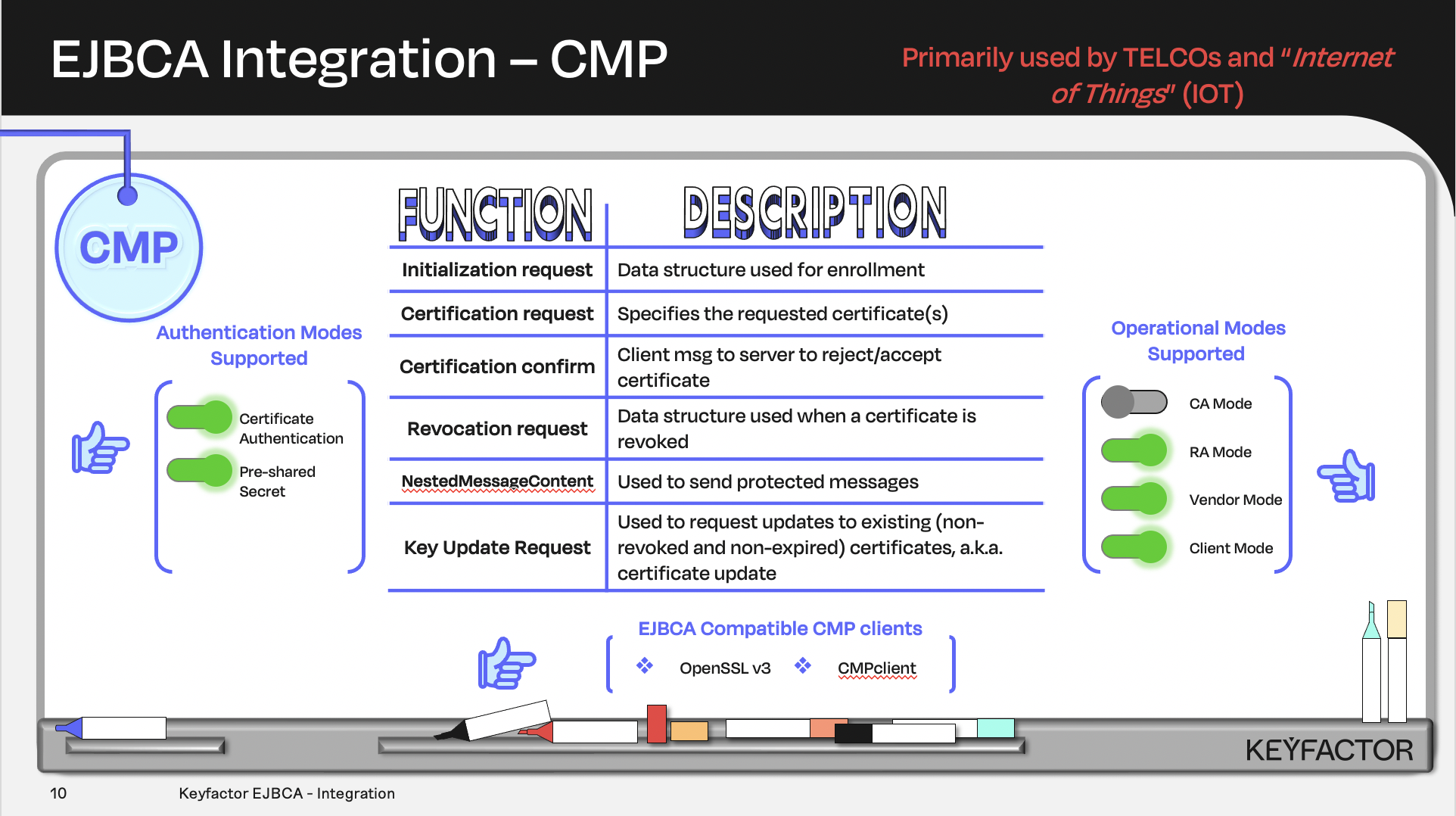
Certificate and CA operations availalble using Certificate Management Protocol (CMP)
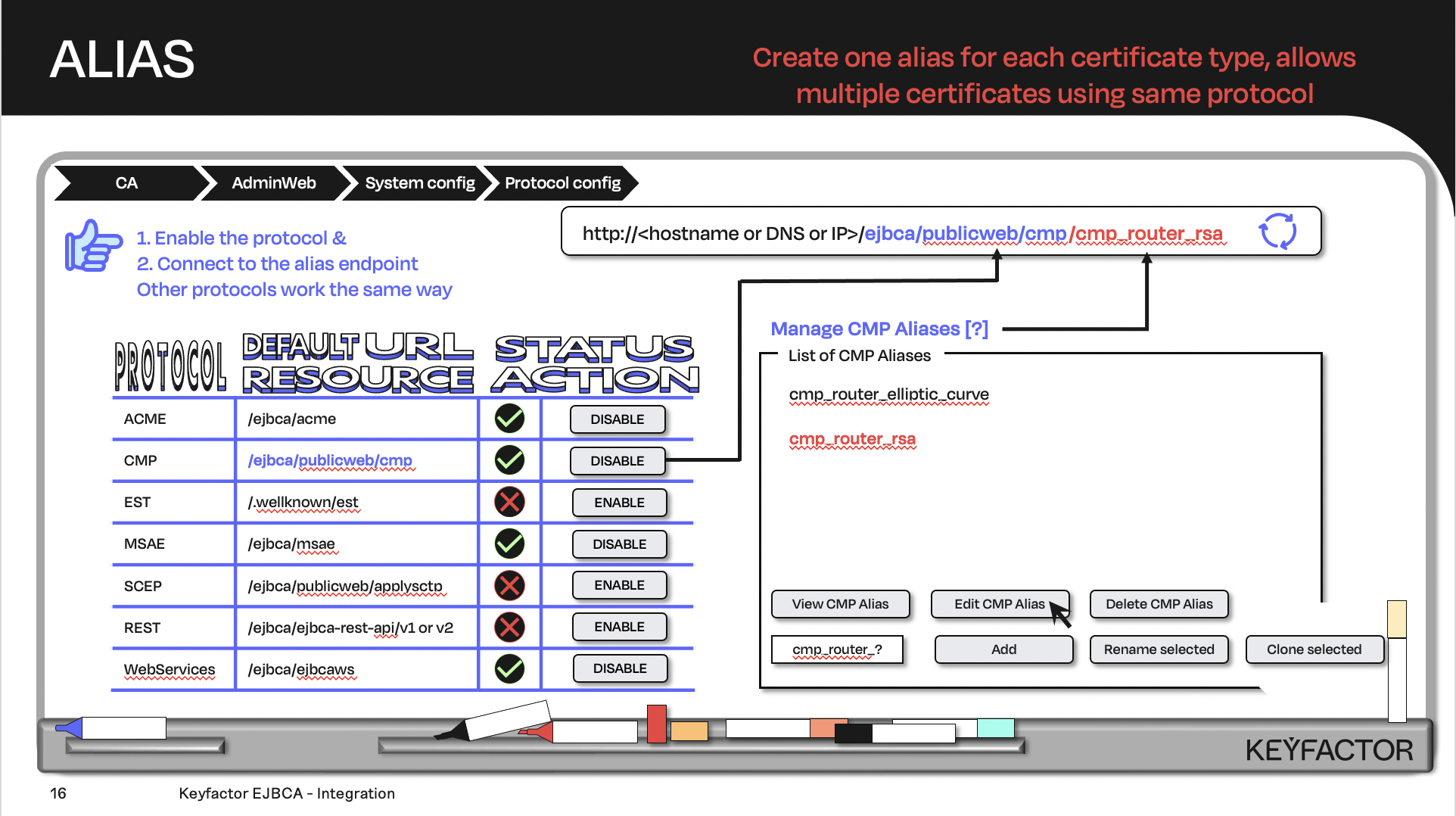
Create the URL with the default URL resource + the protocol alias; the client will contact the URL
Reminder you can visit the Accessing Your Environment page for details on how to connect to your Admin web portal
Create CMP Alias (RA Mode)
To create a CMP alias:
Open a browser and access your Admin Web Portal
Click System Configuration >> CMP Configuration
Click Add
For the name field enter cmp_training
For the CMP Operational Mode, select RA Mode
For the CMP Authentication Module, select Specify Secret and enter foo123 into the field
For the RA Verify Proof-of-Possession, click the Allow checkbox
For the RA End Entity Profile list, select TLSClientEndEntityProfile
For the RA Certificate Profile list, select Profile default
For the RA CA Name list, select Profile default
For the CMP Response Protection list, select signature
Click Save
Reminder you can visit the Accessing Your Environment page for details on how to connect via SSH
CMP Client
To build the CMP client and then issue a certificate:
Open a TERMINAL session from the desktop and change directory:
cd /home/sysadmin/cmpclientRun the command ./cmpclient.sh:
./cmpclient.shThe following results should be displayed:
The following commands are available:
confirm 	Sends a CMP confirmation request and displays the result
crmf 		Sends a CRMF request, an Initialization Request - ir(0), and stores the returned certificate in a local directory. The certificate file name will have the format <CN>.pem
p10cr       Sends a P10CR request and stores the returned certificate in a local directory. The certificate file name will have the format <CN>.pem
revoke 		Sends a CMP revocation request and displays the result
update 		Sends a KeyUpdate request and stores the returned certificate in a local directory. The certificate file name will have the format <CN>.pem
Type a command and "--help" for more information.
Issue certificate via CMP client:
./cmpclient.sh crmf --dn "CN=CmpClient00,O=PrimeKey Solutions AB,C=SE" \
--url http://ca.keyfactor.training/ejbca/publicweb/cmp/cmp_training --authparam foo123
The following results should be displayed:
Using default authentication module: HMAC
Using CMP URL: http://ca.keyfactor.training/ejbca/publicweb/cmp/cmp_training
Using default destination directory: ./dest/
CRMF request successful. Received certificate stored in dest/CmpClient00.pem
Generated private key stored in dest/CmpClient00-key.pem
View certificate via OpenSSL:
openssl x509 -in dest/CmpClient00.pem -noout -text | moreSimilar information will be returned after running the last command.
Certificate:
    Data:
        Version: 3 (0x2)
        Serial Number:
            41:5c:79:87:76:d7:97:36:67:4a:23:c2:09:49:cd:83:cf:73:c7:91
    Signature Algorithm: sha256WithRSAEncryption
        Issuer: C = SE, O = PrimeKey Solutions AB, CN = Sub CA
        Validity
            Not Before: Jun 28 20:46:15 2025 GMT
            Not After : Jun 27 20:46:14 2027 GMT
        Subject: C = SE, O = PrimeKey Solutions AB, CN = CmpClient00
        Subject Public Key Info:
            Public Key Algorithm: rsaEncryption
                Public-Key: (2048 bit)
                Modulus:
                    00:a6:ba:2e:79:01:bb:25:96:86:a9:b3:18:a5:4d:
                    f5:00:a4:9f:87:73:30:1d:d6:f8:a3:f4:82:fd:6b:
                    bd:99:74:25:37:02:18:9f:30:72:5d:8f:a2:8f:d0:
                    c4:69:8f:5c:6b:b9:52:be:f2:38:e6:53:dc:15:fe:
                    ...
? Question and Answers ?