%20(500%20x%20162%20px)(1).png)
Custom Certificate Extensions Workflow
Configuration of custom certificate extensions is described in the following sections
Add Custom Certificate Extension

Reminder you can visit the Accessing Your Environment page for details on how to find your AdminWeb Portal
To add a new custom certificate extension, do the following:
Open a browser and access your AdminWeb Portal
Click System Configuration >> System Configuration
Click on the Custom Certificate Extensions tab
In the Object Identifier (OID) field, enter 1.2.3.4 as unique Object Identifier (OID) for the custom extension
In the Label field, enter MyCustomExtension as label for the custom extension
Click the Add button under actions
Click the Edit button under actions for the newly added custom certificate extension
Set Dynamic to true
Set Encoding to DERUTF8STRING
Click Save
Enable Custom Certificate Extension in Certificate Profile
Reminder you can visit the Accessing Your Environment page for details on how to find your AdminWeb Portal
To enable a custom extension for a certificate profile, do the following:
Open a browser and access your AdminWeb Portal
Click CA Functions >> Certificate Profiles
For the CustomExtensionCertificateProfile, click Edit
In the Used Custom Certificate Extensions list, select MyCustomExtension
In the Available CAs list, select Sub CA
Click Save
Enable Entering Custom Certificate Extension Data in End Entity Profile
Reminder you can visit the Accessing Your Environment page for details on how to find your AdminWeb Portal
To enable entering dynamic custom certificate extension data for end entities, perform following:
Open a browser and access your AdminWeb Portal
Click RA Functions >> End Entity Profiles
In the List of End Entity Profiles list, select CustomExtensionEndEntityProfile
Click Edit End Entity Profile
In the Default CA list, select Sub CA
In the Available CAs list, select Sub CA
In the Other certificate data section, check the Use checkbox for Custom certificate extension data
Click Save
Issue Certificate with Custom Certificate Extension
Reminder you can visit the Accessing Your Environment page for details on how to find your RA Web Portal
To issue a certificate with a custom extension containing dynamic data, do the following:
Open a browser and click RA Web, from the ribbon menu across the top of page
Click Enroll >> Make New Request
In the Certificate Type drop-down list, select CustomExtensionEndEntityProfile
In the Key-pair generation selection, select By the CA
In the CN, Common name field, enter training_customextension
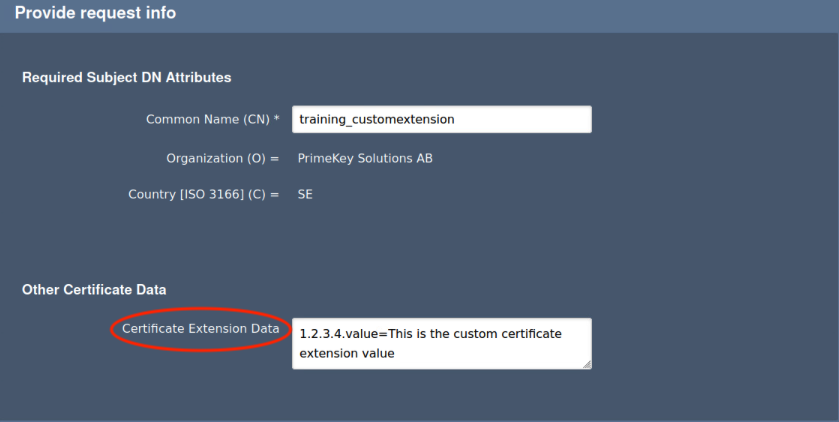
The Certificate Data Extension field, expects the data in oid key=attribute value format, i.e. custom oid.value=some text.
In the Certificate Extension Data field, enter 1.2.3.4.value=This is the custom certificate extension value. As shown here.
 |
In the Username field, enter training_customextension
In the Enrollment code field, enter foo123
In the Confirm enrollment code field, enter foo123
Click Download PEM
Save the file as training_customextension.pem
Viewing Certificate Extension using openssl
To view the certificate in order to confirm that the custom certificate extension is used, do the following:
Open the TERMINAL application on the desktop & change directory to the downloaded PEM file
Run the following openssl command
cd ~/Downloads
openssl x509 -in training_customextension.pem -text -noout
Verify the following line is present in the certificate dump:
1.2.3.4:
  This is the custom certificate extension value
Viewing Certificate Extension using RAWeb
Reminder you can visit the Accessing Your Environment page for details on how to find your PublicWeb Portal
To view the certificate in order to confirm that the custom certificate extension is used, do the following:
Open a browser and click RA Web, from the ribbon menu across the top of page
Click Tools >> Inspect certificate/CSR
Click Upload a file
Click Home >> Downloads
Select training_customextension.pem
Click Select
The following line should present in the certificate dump:
critical(false) 1.2.3.4 value = UTF8String(This is the custom certificate extension value)