%20(500%20x%20162%20px)(1).png)
EST
Introduction

Integration - Enrollment over Secure Transport (EST)
Slide Deck: Integration
Overview:
This lab demonstrates two different modes for creating a certificate using the EST protocol.
The first mode creates a certificate for an entry that PRE-EXISTS in the database (a.k.a. Client Mode). First, a certificate profile and an end entity profile will be created for use with the EST protocol.
Next, an entry will be added to the database. This will simulate pre-loaded entries for instance.
An alias will be created for the EST protocol. The EST client will contact an endpoint (alias) and request a certificate be generated using the EST Client Mode. The RA Mode alias, will also be created in this section, and used at a later time during the lab.
The final step is to ENABLE the EST protocol. A request to generate a certificate will be sent using OPENSSL for each mode.
The section entitled "Enroll for a certificate using EST RA mode", will generate the entry and certificate at the same time. RA mode will ALSO demonstrate a KEY RENEWAL process whereby a certificate is RENEWED using an existing certificate to authenticate to EJBCA. At the end of that process, the entry will contain (2) certificates; the original and the renewal.
Slide Reference
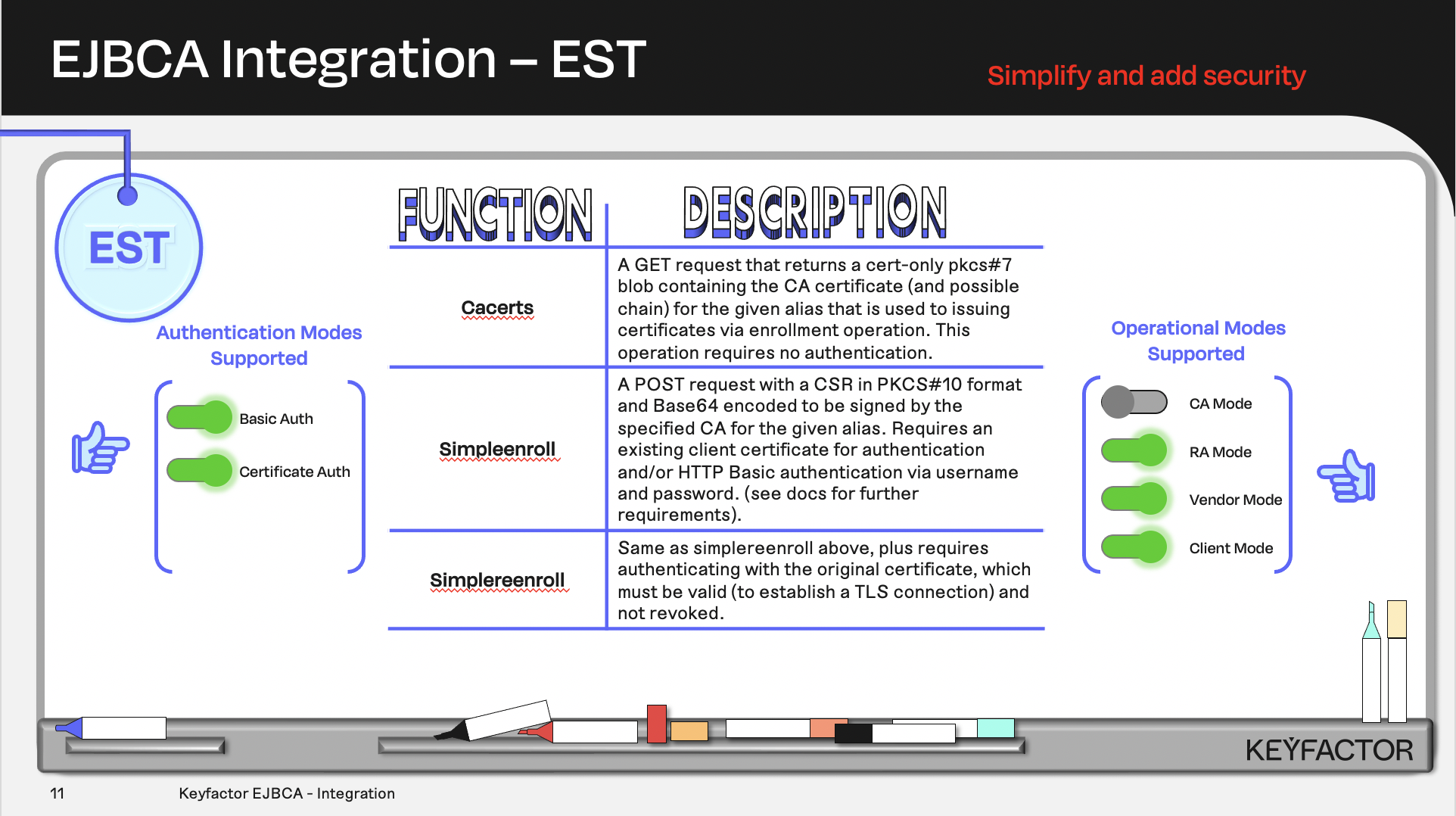
Certificate and CA operations available using Enrollment over Secure Transport (EST)
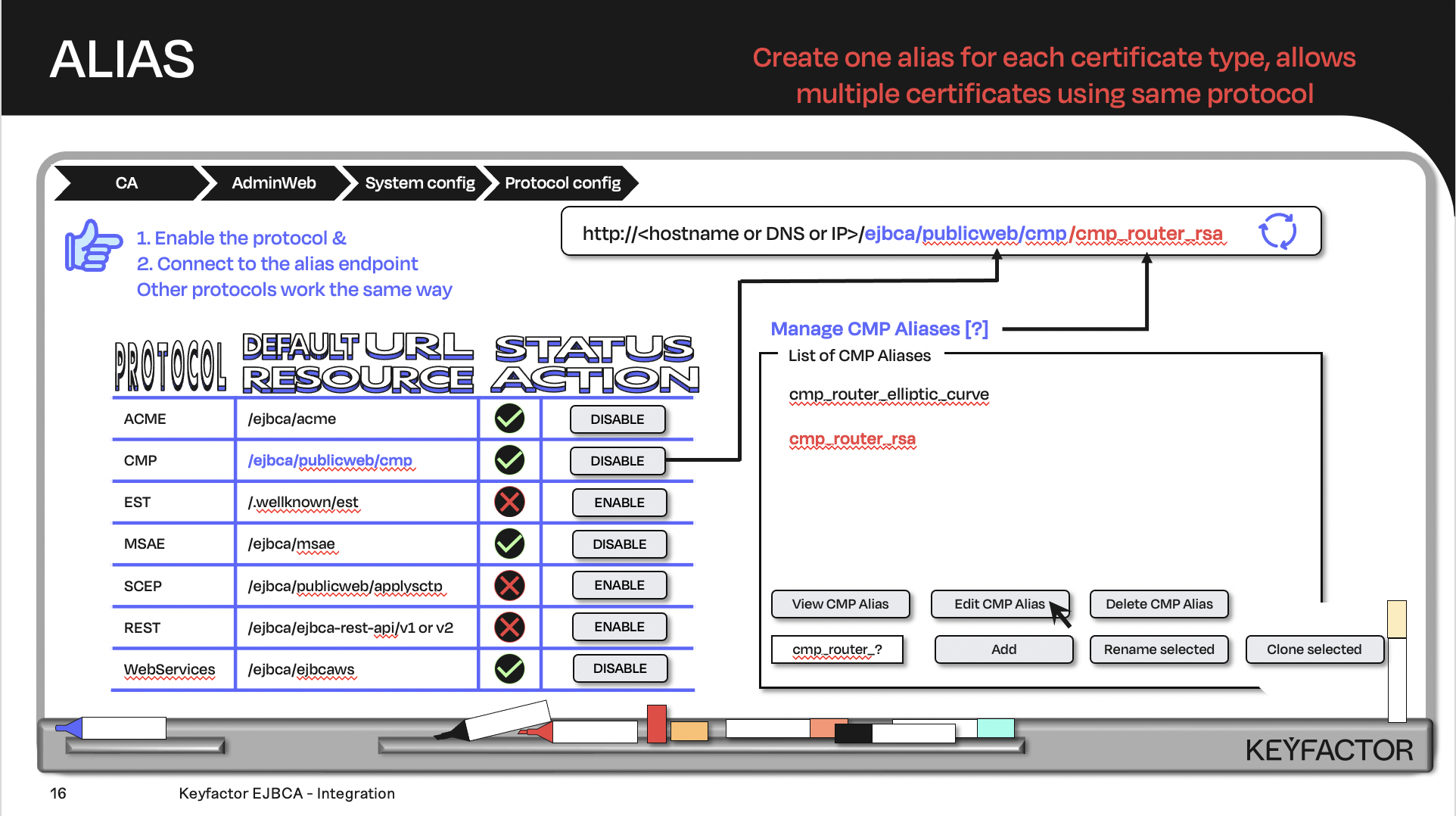
Create the URL with the default URL resource + the protocol alias; the client will contact the URL
Reminder you can visit the Accessing Your Environment page for details on how to connect to your Admin web portal
Create a Certificate Profile for EST
Open a browser and access the Admin Web portal
Click on CA Functions >> Certificate Profiles
Click on Clone to clone the TLSClientCertificateProfile certificate profile
Type in EST-RSA2k as the name of the certificate profile and click on Create from template
Click on Edit to edit the EST-RSA2k certificate profile
Uncheck the LDAP DN Order located in the Other data section
Select Sub CA in the list of Available CAs
Click on Save
Create an End Entity Profile for EST
Open a browser and access the Admin Web portal
Click on RA Functions >> End Entity Profiles
Fill in EST in the Add End Entity profile field and click on Add profile
Select EST in the list of end entity profiles and click on Edit End Entity Profile
In the Subject DN Attributes list, select O, Organization and click Add
In the O, Organization field:
Enter the text PrimeKey Solutions AB
Select Required
Deselect Modifiable
In the Subject DN Attributes list, select C, Country (ISO 3166) and click Add
In the C, Country (ISO 3166) field:
Enter the text SE
Select Required
Deselect Modifiable
In the Subject Alternative Name drop-down, select DNS Name and click on Add
Choose EST-RSA2k as Default Certificate Profile
Select EST-RSA2k in the list of Available Certificate Profiles
Choose Sub CA as Default CA
Chose Sub CA in the list of Available CAs
Choose User Generated in the list of Available Tokens
Click on Save
Create EST End Entity for Client Mode
To create an end entity that will be enrolled using EST in Client mode:
Open a browser and access the Admin Web portal
Click RA Functions >> Add End Entity
In the End Entity Profile list, select EST
In the Username field, enter est-client.primekey.training
In the Password field, enter foo123
In the Confirm Password field, enter foo123
In the CN, Common name field, enter est-client.primekey.training
In the Certificate Profile list, select EST-RSA2k
In the CA list, select Sub CA
In the Token list, select User Generated
Click Add
Create EST Aliases
CREATE EST Client Mode Alias
Click on System Configuration >> EST Configuration
Click on Add to add a new alias
For the name field enter, enter client

The alias name is CaSe SEnsiTive - please use all lowercase
Enable the radio button to select Client Mode for the EST Operational Mode
Select CN from the drop down list for the Extract Username Component
In the Authentication Module section, check the box for HttpBasicAuth
In the CA Name section, select Sub CA from the drop down list
Click on Save
CREATE EST RA Mode Alias
Click on Add to add a new alias
For the name field enter, enter estra
The alias name is CaSe SEnsiTive - please use all lowercase
In the RA CA Name section, select Sub CA from the drop down list
In the End Entity Profile section, select EST from the drop down list
In the Certificate Profile section, select EST-RSA2k from the drop down list
In the Require Client Certificate section, uncheck the Yes checkbox
In the Client Username section, enter ejbca
In the Client Password section, enter foo123
Click on Save
Enable the EST Protocol
Click on System Configuration >> System Configuration
Click on the Protocol Configuration tab
Click on Enable for the EST protocol
Reminder you can visit the Accessing Your Environment page for details on how to connect to connect via SSH
Generate EST Keystore
To generate the EST client keystore and certificate locally on the CLIENT instance
Open RAWeb from the EJBCA ribbon
Click CA Certificates & CRLs
Under the Certificate column, for the ManagementCA click PEM
This will download the ManagementCA.pem file to /home/sysadmin/Downloads folder
Open the TERMINAL application and move the ManagementCA.pem file to the sysadmin home directory
cd ~
mv ~/Downloads/ManagementCA.pem ~
Enroll for Certificate Using EST Client Mode
Edit the EST CLIENT mode configuration file
vim est-client-csr.confAdd the following to the file:
[ req ]
default_bits = 2048
distinguished_name = req_distinguished_name
req_extensions = req_ext
prompt = no

[ req_distinguished_name ]
countryName = US
organizationName = Primekey Solutions AB
commonName = est-client.primekey.training


[ req_ext ]
subjectAltName = @alt_names

[alt_names]
DNS.1 = est-client.primekey.training
Save and close the file using :wq!
Create the CSR to enroll with the EST
NONEopenssl req -new -config est-client-csr.conf -newkey rsa:2048 -nodes -keyout est-client-csr.key -outform DER -out est-client.csrConvert the CSR to base64
NONEopenssl base64 -in est-client.csr -out est-client.csr.b64 -eEnroll for a certificate using the EST Client mode alias
curl -v --cacert ManagementCA.pem --user est-client.primekey.training:foo123 --data @est-client.csr.b64 -o est-client-p7.b64 -H "Content-Type: application/pkcs10" -H "Content-Transfer-Encoding: base64" https://ca.keyfactor.training/.well-known/est/client/simpleenrollThe following results should be displayed:
You should have something like the following returned, after running the above command.

* Connected to ca.keyfactor.training (172.31.41.201) port 443 (#0)
* ALPN, offering h2
* ALPN, offering http/1.1
* Cipher selection: ALL:!EXPORT:!EXPORT40:!EXPORT56:!aNULL:!LOW:!RC4:@STRENGTH
* successfully set certificate verify locations:
*  CAfile: managementca.crt
*  CApath: none
* TLSv1.2 (OUT), TLS header, Certificate Status (22):
} [5 bytes data]
* TLSv1.2 (OUT), TLS handshake, Client hello (1):
.
.
.
.
100  2492  100  1600  100   892  20110  11211 --:--:-- --:--:-- --:--:-- 31544

* Connection #0 to host ca.keyfactor.training left intact
Decode the response and review the certificate. Note: these are 3 separate commands each starts with openssl.
openssl base64 -in est-client-p7.b64 -out est-client-p7.der -d
openssl pkcs7 -inform DER -in est-client-p7.der -print_certs -out est-client-cert.pem
openssl x509 -in est-client-cert.pem -text -noout
The following results should be displayed:
You should have something like the following returned after running the last command.
Certificate:
    Data:
        Version: 3 (0x2)
        Serial Number:
            41:5c:79:87:76:d7:97:36:67:4a:23:c2:09:49:cd:83:cf:73:c7:91
    Signature Algorithm: sha256WithRSAEncryption
        Issuer: C=SE, O=PrimeKey Solutions AB, CN=Sub CA
        Validity
            Not Before: Sep 28 20:46:15 2023 GMT
            Not After : Sep 27 20:46:14 2025 GMT
        Subject: C=SE, O=PrimeKey Solutions AB, CN=est-client.primekey.training
        Subject Public Key Info:
            Public Key Algorithm: rsaEncryption
                Public-Key: (2048 bit)
                Modulus:
                    00:a6:ba:2e:79:01:bb:25:96:86:a9:b3:18:a5:4d:
                    f5:00:a4:9f:87:73:30:1d:d6:f8:a3:f4:82:fd:6b:
                    bd:99:74:25:37:02:18:9f:30:72:5d:8f:a2:8f:d0:
                    c4:69:8f:5c:6b:b9:52:be:f2:38:e6:53:dc:15:fe:
                    34:b5:35:0a:ee:2f:cf:44:d4:4d:b8:59:39:6b:0d:
                    51:9f:56:d1:6f:80:68:bc:33:86:95:69:df:3b:62:
                    fe:57:09:62:8d:6c:9e:06:93:6d:4c:6f:c6:64:0f:
                    9e:54:c5:6d:9f:db:22:5e:7b:62:30:9d:c7:9d:5a:
                    12:1a:51:c5:33:62:b4:c9:57:7c:69:e2:ed:02:d3:
                    82:47:c2:81:a9:bc:1d:76:ba:a2:02:61:ff:87:09:
                    a1:22:16:e5:6e:9a:54:de:76:bc:a4:95:f5:ed:78:
                    8b:ed:aa:f6:70:b7:bb:2f:37:f8:06:8c:90:ad:4d:
                    94:a4:37:ec:90:37:c1:da:02:05:3e:45:a2:dd:68:
                    1f:bf:d0:b5:35:de:28:39:c7:17:66:a5:f1:f8:76:
                    f9:51:b4:6e:b6:d3:f4:12:56:8f:c4:70:e9:c0:bc:
                    15:a8:35:a2:d3:bd:5b:3c:39:79:34:16:d7:15:f0:
                    5c:36:a2:2a:3f:ba:11:31:32:0b:07:29:de:31:f3:
                    4f:3b
                Exponent: 65537 (0x10001)
        X509v3 extensions:
            X509v3 Basic Constraints: critical
                CA:FALSE
            X509v3 Authority Key Identifier:
                keyid:EF:EF:3C:4B:D1:0E:C4:F7:94:D8:01:A2:51:19:D6:79:F0:6E:0A:AB

            X509v3 Extended Key Usage:
                TLS Web Client Authentication
            X509v3 Subject Key Identifier:
                4E:EC:38:45:E2:5E:EE:53:59:9C:9B:67:E5:F2:E2:B8:6F:12:DC:12
            X509v3 Key Usage: critical
                Digital Signature, Key Encipherment
    Signature Algorithm: sha256WithRSAEncryption
         bc:02:23:26:04:21:7a:a1:50:c4:ef:b1:c0:47:6b:8a:bb:85:
         77:37:5f:9f:96:03:84:31:37:a9:28:c4:d8:23:f0:2d:10:ef:
         8f:95:ef:79:7a:f3:c7:b9:c4:6d:40:7f:09:f5:ba:44:9f:55:
         de:19:1a:96:0c:4e:3a:73:48:29:41:9d:44:9c:1c:0d:d8:ba:
         38:cf:29:2b:4d:73:1a:17:27:fd:4a:c1:96:47:29:51:f3:fb:
         dc:ec:fd:7f:7d:50:12:15:8b:d5:5d:3c:09:8e:d8:2d:c6:6a:
         5f:8f:cf:cb:bc:16:a8:1f:74:de:88:97:7b:8a:65:63:47:fc:
         91:8f:b0:05:71:eb:18:a0:3e:67:75:3a:99:f8:d8:69:9f:94:
         15:b3:28:1b:02:0f:06:8c:95:a3:fc:38:99:8b:61:ae:ee:f9:
         71:5e:bc:ed:2f:8d:10:3a:bb:06:47:a4:3d:15:e5:63:c9:a8:
         f1:6d:ba:16:db:f9:58:50:bd:6b:d0:2e:67:15:36:bb:72:7e:
         05:6a:f0:d8:0d:ae:3b:1d:3c:cd:9d:f7:de:a2:a8:75:b2:e4:
         e8:91:ed:6c:b5:66:42:9e:5d:bd:d6:6d:e8:ef:e4:d5:2d:a8:
         7b:d5:6f:60:59:52:5b:bd:f2:2d:d1:17:f6:14:9f:e5:2f:ac:
         86:be:ee:63:b7:a2:f8:98:99:00:21:70:a3:6d:08:26:a6:92:
         65:17:09:84:a7:ea:4c:6e:cd:f9:4e:fd:5a:cb:e9:31:1d:63:
         ae:14:48:da:b8:e3:e9:ee:c0:6e:86:dd:11:1b:71:11:ca:69:
         2e:6d:c8:1f:c0:9b:63:14:3e:33:bd:2e:eb:dd:d7:a5:82:34:
         02:27:35:d4:7a:47:df:7d:18:a8:75:a8:e9:6e:96:49:e3:35:
         52:4c:39:59:db:72:f8:66:81:38:41:a3:d8:f5:75:37:12:e9:
         23:1b:77:0b:d1:38:52:3a:b7:05:f1:05:03:6f:a2:c1:be:63:
         6f:1b:dc:3a:98:31:06:d0:36:87:02:34:a9:67:27:7a:8b:3f:
         cd:76:c9:a8:87:bc:0c:03:80:39:ad:f3:cc:9e:e4:b4:38:52:
         18:0d:55:e7:0d:f3:82:10:02:36:3f:85:7a:d3:5c:83:52:9e:
         4a:c0:7a:7d:e9:4d:0c:ee:73:8e:e4:41:49:da:3d:b6:8f:22:
         38:67:9d:e6:7c:55:91:94:58:d3:f3:88:70:28:26:84:cd:21:
         79:c3:36:61:7d:ea:f3:e6:ff:17:b7:86:da:e8:c2:dd:de:66:
         4a:ae:47:f3:7d:25:bb:ef:9d:6e:f5:03:57:62:31:ab:33:9b:
         61:2d:01:f2:c8:f6:26:f9
Enroll for a Certificate using EST RA Mode
Edit the EST RA mode configuration file
vim est-ra-csr.confAdd the following to the file:
[ req ]
default_bits = 2048
distinguished_name = req_distinguished_name
req_extensions = req_ext
prompt = no

[ req_distinguished_name ]
C = SE
O = PrimeKey Solutions AB
CN = est-ra.primekey.training

[ req_ext ]
subjectAltName = @alt_names

[alt_names]
DNS.1 = est-ra.primekey.training
Save and close the file using :wq!
Create the CSR to enroll with the EST RA alias
NONEopenssl req -new -config est-ra-csr.conf -newkey rsa:2048 -nodes -keyout est-ra-csr.key -outform DER -out est-ra.csrConvert the CSR to base64
NONEopenssl base64 -in est-ra.csr -out est-ra.csr.b64 -e
Obtain the CA certificate for the EST RA mode alias
curl -v https://ca.keyfactor.training/.well-known/est/estra/cacerts -o cacerts.p7 --cacert ManagementCA.pemThe following results are displayed:
You should see similar results:

{ [5 bytes data]
* Mark bundle as not supporting multiuse
< HTTP/1.1 200 OK
< Date: Wed, 16 Mar 2022 19:16:09 GMT
< Server: Apache
< Strict-Transport-Security: max-age=31536000; includeSubDomains
< Content-Transfer-Encoding: base64
< Content-Type: application/pkcs7-mime
< Content-Length: 3871
< Content-Security-Policy: default-src 'self'; script-src 'self' 'unsafe-inline' 'unsafe-eval'; style-src 'self' 'unsafe-inline'; frame-ancestors 'self'
<
{ [3871 bytes data]
100  3871  100  3871    0     0   304k      0 --:--:-- --:--:-- --:--:--  315k

* Connection #0 to host ca.keyfactor.training left intact
Enroll for a certificate using the EST RA mode alias
curl -v --cacert ManagementCA.pem --user ejbca:foo123 --data @est-ra.csr.b64 -o est-ra-p7.b64 -H "Content-Type: application/pkcs10" -H "Content-Transfer-Encoding: base64" https://ca.keyfactor.training/.well-known/est/estra/simpleenrollYou should see similar results:
* Mark bundle as not supporting multiuse
< HTTP/1.1 200 OK
< Date: Wed, 16 Mar 2022 19:18:39 GMT
< Server: Apache
< Strict-Transport-Security: max-age=31536000; includeSubDomains
< Content-Transfer-Encoding: base64
< Content-Type: application/pkcs7-mime; smime-type=certs-only
< Content-Length: 1657
< Content-Security-Policy: default-src 'self'; script-src 'self' 'unsafe-inline' 'unsafe-eval'; style-src 'self' 'unsafe-inline'; frame-ancestors 'self'
<
{ [1657 bytes data]
100 2545 100 1657 100 888 21445 11492 --:--:-- --:--:-- --:--:-- 33051
* Connection #0 to host ca.keyfactor.training left intactDecode the response and review the certificate
NONEopenssl base64 -in est-ra-p7.b64 -out est-ra-p7.der -d openssl pkcs7 -inform DER -in est-ra-p7.der -print_certs -out est-ra-cert.pem openssl x509 -in est-ra-cert.pem -text -nooutThe following results should be displayed:
NONECertificate: Data: Version: 3 (0x2) Serial Number: 13:6a:2c:89:c0:8c:1a:4f:78:0c:91:b0:5f:54:33:5d:fa:81:ac:93 Signature Algorithm: sha256WithRSAEncryption Issuer: C=SE, O=PrimeKey Solutions AB, CN=Sub CA Validity Not Before: Sep 28 20:59:27 2023 GMT Not After : Sep 27 20:59:26 2025 GMT Subject: C=SE, O=PrimeKey Solutions AB, CN=est-ra.primekey.training Subject Public Key Info: Public Key Algorithm: rsaEncryption Public-Key: (2048 bit) Modulus: 00:c8:ae:9c:73:61:a4:28:57:75:21:e2:56:6a:8b: 9b:63:56:dd:ae:20:6b:cc:0d:e6:a8:c2:8d:c7:07: 4b:4c:4e:77:b7:30:d3:ee:15:12:4a:e8:72:84:af: 3c:e9:22:79:bf:4d:9e:8f:64:69:18:64:34:db:91: f4:51:e5:bc:bd:37:04:a4:3e:3f:58:da:10:b7:ef: 44:58:22:1e:ab:34:a6:2e:72:44:4b:f6:ef:61:1d: 73:69:c2:fc:aa:e7:e3:69:20:93:f2:96:96:77:fc: 7b:44:09:f4:cf:5c:a5:03:27:41:27:0f:04:2a:ac: e3:81:88:47:39:1c:d4:21:ae:dd:c8:2d:cb:12:e2: 84:b3:b0:9f:45:19:d8:b4:d6:82:b2:fc:c8:62:bd: dc:fd:b7:bf:35:79:18:54:19:95:ea:f3:16:0b:3e: 2a:39:7a:72:d5:55:4a:6e:10:0a:ba:bf:1b:a7:1d: da:bb:a0:5b:2b:b6:a0:c0:02:0d:2e:98:94:c5:29: ad:03:bf:41:fc:f0:d1:29:46:6e:b1:1a:6a:ea:76: 38:82:55:c8:03:72:ce:b5:eb:48:30:20:29:52:ff: f5:9d:5f:04:ff:8e:49:c6:d0:32:c7:be:3a:58:79: 4c:b7:d2:81:f9:cf:13:9f:24:82:2f:01:b2:d4:63: 01:a5 Exponent: 65537 (0x10001) X509v3 extensions: X509v3 Basic Constraints: critical CA:FALSE X509v3 Authority Key Identifier: keyid:EF:EF:3C:4B:D1:0E:C4:F7:94:D8:01:A2:51:19:D6:79:F0:6E:0A:AB X509v3 Subject Alternative Name: DNS:est-ra.primekey.training X509v3 Extended Key Usage: TLS Web Client Authentication X509v3 Subject Key Identifier: 75:F8:2D:23:E3:E1:FB:DC:4F:66:AA:EA:B2:63:F2:ED:29:CF:08:78 X509v3 Key Usage: critical Digital Signature, Key Encipherment Signature Algorithm: sha256WithRSAEncryption ba:d8:ac:37:f2:3d:33:3d:9b:a1:4c:4d:f4:dd:24:bc:19:2d: 6b:fa:92:56:2b:f0:c8:8c:88:90:5c:4b:0f:4b:ad:1e:f5:1f: d8:5b:d2:65:31:6e:ab:53:51:fc:e2:e3:56:fe:29:98:9b:8b: 87:70:b2:45:03:e7:0d:b0:c6:da:1d:a8:ba:87:65:58:5f:e2: 14:1e:63:a5:08:8b:31:b0:41:a9:ef:21:23:38:4d:8f:ce:84: 85:c9:e8:cf:37:1b:c6:54:06:e4:2a:6d:d9:57:fe:e7:cd:25: c3:44:d2:bc:08:03:b0:d3:09:2a:64:32:e6:9d:db:9a:f8:a8: bb:ac:50:36:2a:ca:ed:11:ba:7c:a2:7a:b5:ca:83:cd:a2:e3: 9b:ed:6d:6f:82:9a:33:8f:9c:68:78:12:a7:4e:ba:9e:18:92: 93:ad:1f:5a:70:fe:5d:ff:a0:2b:89:7b:4b:c7:5a:6b:86:af: ec:f0:a3:54:81:11:a3:fb:5b:59:a7:33:ce:82:35:df:5d:0a: 6c:5c:69:f5:cf:78:a1:9f:ac:67:7e:20:9a:2b:bc:b6:4b:af: 12:44:c3:00:7e:d5:f5:b3:58:12:84:e3:e8:4c:e2:eb:62:20: 2c:ba:aa:5e:8f:77:67:11:7d:38:86:3b:b6:c3:37:4d:b8:04: e3:4a:7c:25:44:de:8d:0f:66:4a:d0:81:3a:e8:8c:b0:b5:ef: a0:99:d8:30:d3:2e:0a:6b:bb:e3:e4:e4:3c:18:c3:69:29:fc: 17:3e:24:a0:bc:61:e9:41:00:cc:ef:eb:7c:58:9e:da:88:b5: e0:bf:bb:31:fa:4a:b7:e7:f0:d4:e3:77:8d:2c:0c:4a:a3:4f: 3b:ea:5f:90:b5:ce:ae:80:b1:12:6d:12:d6:36:21:0a:f0:b6: 69:27:90:5a:35:d6:32:56:6b:9e:65:42:99:3e:c6:76:20:76: 59:90:4c:97:49:c5:8f:fd:f3:c2:5e:9d:bd:d6:c8:8c:aa:d7: cc:18:10:4d:9c:4f:21:cd:6d:9f:31:82:6f:9b:60:3f:4a:47: 35:dc:4e:2d:a6:ef:c2:7d:48:fb:83:4d:e5:de:c9:1e:0f:fd: 05:21:1d:45:11:64:04:76:24:c8:32:01:d5:91:9f:c2:09:38: 9b:a5:20:9d:a7:f4:70:6a:b9:2c:40:51:91:7f:fe:d5:96:81: fb:db:8c:cf:c0:7b:4f:08:36:95:7e:60:8a:84:79:6a:c0:48: 2b:94:8f:fa:18:7a:d9:bc:fa:5a:73:62:e4:de:66:8c:bc:a9: 51:25:f9:7f:a1:62:77:54:c3:6f:c9:db:ac:88:fb:dd:4d:6a: 5f:5b:73:52:9f:27:57:0f

? Question and Answers ?