%20(500%20x%20162%20px)(1).png)
CA Commands
Switch to the CA VM instance. This VM provides command line access to EJBCA. Run the following command to invoke the EJBCA CLI tools

Reminder you can visit the Accessing Your Environment page for details on how to connect to your CA VM instance. See the section entitled "Connecting to EJBCA using AdminWeb, and RAWeb via Browser".
docker exec -it ejbca-CA /opt/keyfactor/ejbca/bin/ejbca.sh caThe following commands are available:
activateca Activates the specified CA and crypto token
changecatoken Change Crypto Token and keys for a CA.
changecatokensignalg Changes the signature algorithm and possible keyspec of a CA token
changecertprofile Changes the certificate profile of a CA.
createcrl Issues a new CRL from the CA.
createtruststore Create a truststore from all CA's used in role matching.
deactivateca Makes the specified HSM CA offline.
editca Edits CA fields of an existing CA.
editcertificateprofile Edits profile fields of an existing certificate profile in the CA.
editpublisher Edits publisher fields of an existing publisher in the CA.
exportca Exports CA as a PKCS#12 or PKCS#8 file.
exportprofiles Export profiles from the database to XML-files.
getcacert Save a CA certificate (PEM- or DER-format) to file
getcafield Displays the value of a specific field in an existing CA.
getcrl Retrieves a CRL from a CA. Either the latest CRL or a CRL with a specified CRL number.
getcrlinfo List information about latest CRLs
importca Imports a keystore and creates a new X509 CA from it.
importcacert Imports a PEM file and creates a new external CA representation from it, or imports the certificate for a CA waiting for certificate from an external CA.
importcert Imports a certificate file to the database
importcertdir Imports a directory with PEM encoded certficate file(s) to the database, creating an End Entity (with random pwd and status 'generated') to map the each certificate to.
importcertsms Import certificates and metadata from a Microsoft CA-installation.
importcrl Imports a CRL file (and updates certificates) to the database
importcvcca Imports a PKCS#8 file and creates a new CVC CA from it
importprofiles Import profiles from XML-files to the database
info Shows info about a CA
init Create a CA and its first CRL. Publishes the CRL and CA certificate. Can create a new crypto token for the CA, or re-use an existing crypto token.
listcafields Lists the fields of a CA.
listcas Lists the names of all available CAs
listexpired List certificates that will expire within the given number of days, excluding certificates that are already expired.
listpublishers List the names of all available publishers.
mergecatokens Merge all CA's sharing a PKCS#11 library and slot to use the same Crypto Token
removekeystore Remove the CA token keystore from a CA
removepublisher Remove the Publisher from the system, optionally also removing references from CAs and Certificate Profiles.
renewca Renew CA certificate and optionally regenerate keys
republish Re-publishes the certificates of a CA and/or all users issued by a particular CA.
restorekeystore Restore a CA token keystore from a PKCS12 file.
updatepublickeyblocklist Updates the public key block list datastore.
Example to create a new PKCS#11 crypto token and a CA using this token:
bin/ejbca.sh ca init --caname MyCA --dn CN=MyCA --tokenType org.cesecore.keys.token.PKCS11CryptoToken --tokenprop p11cainit.properties --tokenPass mypin --keyspec 2048 --keytype RSA --policy null -v 3 -s SHA256WithRSA
Example to create a new CA using an existing crypto token:
bin/ejbca.sh ca init --caname MyCA --dn CN=MyCA --tokenName "My Token" -v 3 --policy null -s SHA256WithRSA --keyspec 2048 --keytype RSA --tokenprop token.properties
Type a command and "--help" for more information. Init the CA
From the CA VM instance run the following command to create a new CA using the EJBCA CLI
docker exec -it ejbca-CA ./bin/ejbca.sh ca init clitestca1 --dn "CN=CLI Test CA 1,O=PrimeKey Solutions AB,C=SE" \
--tokenType soft --tokenPass foo123 --keyspec 2048 --keytype RSA -v 365 -s SHA256WithRSA \
--policy "2.5.29.32.0"
Results:
2025-05-01 20:08:05,633+0000 INFO  [org.ejbca.ui.cli.ca.CaInitCommand] (main) Initializing CA
2025-05-01 20:08:05,633+0000 INFO  [org.ejbca.ui.cli.ca.CaInitCommand] (main) Generating rootCA keystore:
2025-05-01 20:08:05,634+0000 INFO  [org.ejbca.ui.cli.ca.CaInitCommand] (main) CA Type:x509
2025-05-01 20:08:05,634+0000 INFO  [org.ejbca.ui.cli.ca.CaInitCommand] (main) CA name: clitestca1
2025-05-01 20:08:05,635+0000 INFO  [org.ejbca.ui.cli.ca.CaInitCommand] (main) SuperAdmin CN: null
2025-05-01 20:08:05,635+0000 INFO  [org.ejbca.ui.cli.ca.CaInitCommand] (main) DN: CN=CLI Test CA 1,O=PrimeKey Solutions AB,C=SE
2025-05-01 20:08:05,636+0000 INFO  [org.ejbca.ui.cli.ca.CaInitCommand] (main) CA token type: soft
2025-05-01 20:08:05,636+0000 INFO  [org.ejbca.ui.cli.ca.CaInitCommand] (main) CA token password: hidden
2025-05-01 20:08:05,636+0000 INFO  [org.ejbca.ui.cli.ca.CaInitCommand] (main) Keytype: RSA
2025-05-01 20:08:05,637+0000 INFO  [org.ejbca.ui.cli.ca.CaInitCommand] (main) Keyspec: 2048
2025-05-01 20:08:05,637+0000 INFO  [org.ejbca.ui.cli.ca.CaInitCommand] (main) Validity: 365d
2025-05-01 20:08:05,637+0000 INFO  [org.ejbca.ui.cli.ca.CaInitCommand] (main) Policy ID: 2.5.29.32.0
2025-05-01 20:08:05,637+0000 INFO  [org.ejbca.ui.cli.ca.CaInitCommand] (main) Signature alg: SHA256WithRSA
2025-05-01 20:08:05,638+0000 INFO  [org.ejbca.ui.cli.ca.CaInitCommand] (main) Certificate profile: ROOTCA
2025-05-01 20:08:05,638+0000 INFO  [org.ejbca.ui.cli.ca.CaInitCommand] (main) CA token properties: {}
2025-05-01 20:08:05,638+0000 INFO  [org.ejbca.ui.cli.ca.CaInitCommand] (main) Signed by: Self signed
2025-05-01 20:08:05,655+0000 INFO  [org.ejbca.ui.cli.ca.BaseCaAdminCommand] (main) Initializing authorization module with caid=1154260 960 and superadmin CN'null'.
2025-05-01 20:08:08,421+0000 INFO  [org.ejbca.ui.cli.ca.CaInitCommand] (main) Creating CA...
2025-05-01 20:08:08,820+0000 INFO  [org.ejbca.ui.cli.ca.CaInitCommand] (main) CAId for created CA: 1154260960
2025-05-01 20:08:08,821+0000 INFO  [org.ejbca.ui.cli.ca.CaInitCommand] (main) Created and published initial CRL.
2025-05-01 20:08:08,821+0000 INFO  [org.ejbca.ui.cli.ca.CaInitCommand] (main) CA initialized
2025-05-01 20:08:08,821+0000 INFO  [org.ejbca.ui.cli.ca.CaInitCommand] (main) Note that open browser sessions may have to be restarted to interact with this CA.
List CAs
From the CA VM instance run the following command to list all the CAs using EJBCA CLI
docker exec -it ejbca-CA ./bin/ejbca.sh ca listcasResults:
2025-05-01 20:26:03,970+0000 INFO  [org.ejbca.ui.cli.ca.CaListCAsCommand] (main) CA Name: ManagementCA
2025-05-01 20:26:03,971+0000 INFO  [org.ejbca.ui.cli.ca.CaListCAsCommand] (main)  Id: 1239364572
2025-05-01 20:26:03,977+0000 INFO  [org.ejbca.ui.cli.ca.CaListCAsCommand] (main)  Issuer DN: UID=c-0tldf2htns5j2ud6j,CN=ManagementCA, O=EJBCA Container Quickstart
2025-05-01 20:26:03,977+0000 INFO  [org.ejbca.ui.cli.ca.CaListCAsCommand] (main)  Subject DN: UID=c-0tldf2htns5j2ud6j,CN=ManagementCA ,O=EJBCA Container Quickstart
2025-05-01 20:26:03,978+0000 INFO  [org.ejbca.ui.cli.ca.CaListCAsCommand] (main)  Type: 1
2025-05-01 20:26:03,980+0000 INFO  [org.ejbca.ui.cli.ca.CaListCAsCommand] (main)  Expire time: Sun Apr 29 13:05:57 UTC 2035
2025-05-01 20:26:03,981+0000 INFO  [org.ejbca.ui.cli.ca.CaListCAsCommand] (main)  Signed by: 1
2025-05-01 20:26:04,044+0000 INFO  [org.ejbca.ui.cli.ca.CaListCAsCommand] (main) CA Name: Sub CA
2025-05-01 20:26:04,045+0000 INFO  [org.ejbca.ui.cli.ca.CaListCAsCommand] (main)  Id: 10663035
2025-05-01 20:26:04,051+0000 INFO  [org.ejbca.ui.cli.ca.CaListCAsCommand] (main)  Issuer DN: CN=Root CA,O=PrimeKey Solutions AB,C=SE
2025-05-01 20:26:04,052+0000 INFO  [org.ejbca.ui.cli.ca.CaListCAsCommand] (main)  Subject DN: CN=Sub CA,O=PrimeKey Solutions AB,C=SE
2025-05-01 20:26:04,052+0000 INFO  [org.ejbca.ui.cli.ca.CaListCAsCommand] (main)  Type: 1
2025-05-01 20:26:04,052+0000 INFO  [org.ejbca.ui.cli.ca.CaListCAsCommand] (main)  Expire time: Thu Jul 26 19:42:09 UTC 2035
2025-05-01 20:26:04,052+0000 INFO  [org.ejbca.ui.cli.ca.CaListCAsCommand] (main)  Signed by: -1348709887
2025-05-01 20:26:04,098+0000 INFO  [org.ejbca.ui.cli.ca.CaListCAsCommand] (main) CA Name: External Sub CA
2025-05-01 20:26:04,099+0000 INFO  [org.ejbca.ui.cli.ca.CaListCAsCommand] (main)  Id: -1548299414
2025-05-01 20:26:04,100+0000 INFO  [org.ejbca.ui.cli.ca.CaListCAsCommand] (main)  Issuer DN: CN=Root CA,O=PrimeKey Solutions AB,C=SE
2025-05-01 20:26:04,100+0000 INFO  [org.ejbca.ui.cli.ca.CaListCAsCommand] (main)  Subject DN: CN=External Sub CA,O=PrimeKey Solutions AB,C=SE
2025-05-01 20:26:04,100+0000 INFO  [org.ejbca.ui.cli.ca.CaListCAsCommand] (main)  Type: 1
2025-05-01 20:26:04,101+0000 INFO  [org.ejbca.ui.cli.ca.CaListCAsCommand] (main)  Expire time: Thu Jul 26 19:46:42 UTC 2035
2025-05-01 20:26:04,101+0000 INFO  [org.ejbca.ui.cli.ca.CaListCAsCommand] (main)  Signed by: 2
2025-05-01 20:26:04,126+0000 INFO  [org.ejbca.ui.cli.ca.CaListCAsCommand] (main) CA Name: clitestca1
2025-05-01 20:26:04,127+0000 INFO  [org.ejbca.ui.cli.ca.CaListCAsCommand] (main)  Id: 1154260960
2025-05-01 20:26:04,129+0000 INFO  [org.ejbca.ui.cli.ca.CaListCAsCommand] (main)  Issuer DN: CN=CLI Test CA 1,O=PrimeKey Solutions AB,C=SE
2025-05-01 20:26:04,129+0000 INFO  [org.ejbca.ui.cli.ca.CaListCAsCommand] (main)  Subject DN: CN=CLI Test CA 1,O=PrimeKey Solutions AB,C=SE
2025-05-01 20:26:04,129+0000 INFO  [org.ejbca.ui.cli.ca.CaListCAsCommand] (main)  Type: 1
2025-05-01 20:26:04,131+0000 INFO  [org.ejbca.ui.cli.ca.CaListCAsCommand] (main)  Expire time: Fri May 01 20:08:07 UTC 2026
2025-05-01 20:26:04,131+0000 INFO  [org.ejbca.ui.cli.ca.CaListCAsCommand] (main)  Signed by: 1
2025-05-01 20:26:04,160+0000 INFO  [org.ejbca.ui.cli.ca.CaListCAsCommand] (main) CA Name: Root CA
2025-05-01 20:26:04,162+0000 INFO  [org.ejbca.ui.cli.ca.CaListCAsCommand] (main)  Id: -1348709887
2025-05-01 20:26:04,165+0000 INFO  [org.ejbca.ui.cli.ca.CaListCAsCommand] (main)  Issuer DN: CN=Root CA,O=PrimeKey Solutions AB,C=SE
2025-05-01 20:26:04,165+0000 INFO  [org.ejbca.ui.cli.ca.CaListCAsCommand] (main)  Subject DN: CN=Root CA,O=PrimeKey Solutions AB,C=SE
2025-05-01 20:26:04,166+0000 INFO  [org.ejbca.ui.cli.ca.CaListCAsCommand] (main)  Type: 1
2025-05-01 20:26:04,167+0000 INFO  [org.ejbca.ui.cli.ca.CaListCAsCommand] (main)  Expire time: Sat Oct 21 19:35:09 UTC 2045
2025-05-01 20:26:04,167+0000 INFO  [org.ejbca.ui.cli.ca.CaListCAsCommand] (main)  Signed by: 1
Create a CRL
From the CA VM instance run the following command to create a CRL using EJBCA CLI
docker exec -it ejbca-CA ./bin/ejbca.sh ca createcrlResults:
2025-05-01 20:31:34,349+0000 INFO  [org.ejbca.ui.cli.ca.BaseCaAdminCommand] (main)   1 CRLs have been created.
2025-05-01 20:31:34,368+0000 INFO  [org.ejbca.ui.cli.ca.BaseCaAdminCommand] (main)   0 delta CRLs have been created.
From the CA VM instance run the following command to force the creation of a CRL for the ManagementCA using EJBCA CLI
docker exec -it ejbca-CA ./bin/ejbca.sh ca createcrl ManagementCAResults:
2025-05-01 20:38:56,812+0000 INFO [org.ejbca.ui.cli.ca.BaseCaAdminCommand] (main) CRL with number 4 generated.De-activate and Activate CA
From the CA VM instance run the following command to DEACTIVATE the clitestca1 CA using EJBCA CLI
docker exec -it ejbca-CA ./bin/ejbca.sh ca deactivateca --caname clitestca1Results:
2025-05-01 20:41:53,534+0000 INFO  [org.ejbca.ui.cli.ca.CaDeactivateCACommand] (main) CA Service deactivated.
2025-05-01 20:41:53,942+0000 INFO  [org.ejbca.ui.cli.ca.CaDeactivateCACommand] (main) CA CryptoToken deactivated.
From the CA VM instance run the following command to ACTIVATE the clitestca1 CA using EJBCA CLI, note the PIN code must be provided on the command when using the container version, other versions will prompt for the --code flag if missing.
docker exec -it ejbca-CA ./bin/ejbca.sh ca activateca --caname clitestca1 --code foo123Results:
2025-05-01 20:51:59,035+0000 INFO [org.ejbca.ui.cli.ca.CaActivateCACommand] (main) CA Service activated.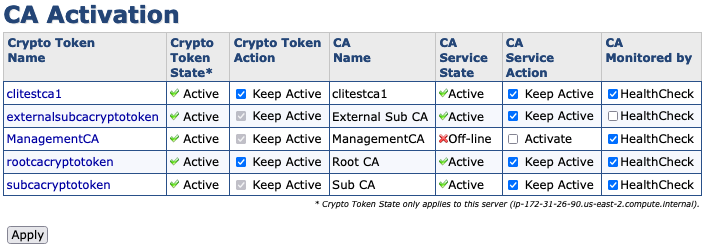
CA instance Admin Web - Management CA deactivated using CLI tool
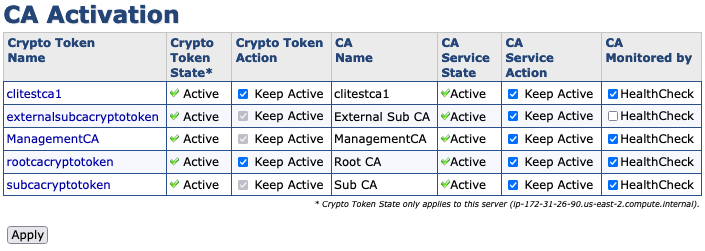
CA instance Admin Web - Management CA activated using CLI tool and providing token PIN

? Question and Answers ?