%20(500%20x%20162%20px)(1).png)
Roles Commands
Available Commands
Switch to the CA VM instance. This VM provides command line access to EJBCA. Run the following command to invoke the EJBCA CLI tools.

Reminder you can visit the Accessing Your Environment page for details on how to connect to your CA VM instance. See the section entitled "Connecting to EJBCA using AdminWeb, and RAWeb via Browser".
docker exec -it ejbca-CA ./bin/ejbca.sh roles
The following commands are available:

addrole 		Adds an administrative role.
addrolemember	Adds a member to a role.
changerule 		Changes an access rule
listadmins 		Lists admins in a role.
listroles 		Lists admin roles
listrules 		Lists access rules for a role
removeadmin 	Removes an admin
removerole 		Remove admin role

Type a command and "--help" for more information.
Adding Administrator to Role using CLI
From the CA instance, run the following command to create a NEW Administrator using EJBCA CLI.
docker exec -it ejbca-CA ./bin/ejbca.sh roles addrolemember --role "Training Custom Role" --caname "ManagementCA" \
--with CertificateAuthenticationToken:WITH_COMMONNAME --value "Cli Admin"
You can view the roles in AdminWeb before adding Cli Admin to Training Custom Role using the EJBCA CLI.

After the role Training Custom Role is added using the CLI Admin, the AdminWeb gui will look like this.

Results
Role member was successfully added.
Issuing Certificate for the Role
There are two steps to this process. The first is to create the end entity using EJBCA CLI, and the second step is to issue the certificate using RA Web.
From the CA instance, run the following command to add a NEW end entity using EJBCA CLI.
docker exec -it ejbca-CA ./bin/ejbca.sh ra addendentity --username cli_admin --password foo123 --dn \
"CN=Cli Admin,O=PrimeKey Solutions AB,C=SE" --caname ManagementCA --token P12 \
--eeprofile AdministratorEndEntityProfile --certprofile AdministratorCertificateProfile --type 1
Results:
2025-05-02 11:43:07,223+0000 INFO  [org.ejbca.ui.cli.ra.AddEndEntityCommand] (main) Trying to add end entity:
2025-05-02 11:43:07,223+0000 INFO  [org.ejbca.ui.cli.ra.AddEndEntityCommand] (main) Username: cli_admin
2025-05-02 11:43:07,223+0000 INFO  [org.ejbca.ui.cli.ra.AddEndEntityCommand] (main) Password: <password hidden>
2025-05-02 11:43:07,223+0000 INFO  [org.ejbca.ui.cli.ra.AddEndEntityCommand] (main) DN: CN=Cli Admin,O=PrimeKey Solutions AB,C=SE
2025-05-02 11:43:07,223+0000 INFO  [org.ejbca.ui.cli.ra.AddEndEntityCommand] (main) CA Name: ManagementCA
2025-05-02 11:43:07,223+0000 INFO  [org.ejbca.ui.cli.ra.AddEndEntityCommand] (main) SubjectAltName: null
2025-05-02 11:43:07,223+0000 INFO  [org.ejbca.ui.cli.ra.AddEndEntityCommand] (main) Email: null
2025-05-02 11:43:07,231+0000 INFO  [org.ejbca.ui.cli.ra.AddEndEntityCommand] (main) Type: 1
2025-05-02 11:43:07,231+0000 INFO  [org.ejbca.ui.cli.ra.AddEndEntityCommand] (main) Token: P12
2025-05-02 11:43:07,231+0000 INFO  [org.ejbca.ui.cli.ra.AddEndEntityCommand] (main) Certificate profile: 157732984
2025-05-02 11:43:07,231+0000 INFO  [org.ejbca.ui.cli.ra.AddEndEntityCommand] (main) End entity profile: 1147859369
2025-05-02 11:43:07,303+0000 INFO  [org.ejbca.ui.cli.ra.AddEndEntityCommand] (main) User 'cli_admin' has been added.
2025-05-02 11:43:07,303+0000 INFO  [org.ejbca.ui.cli.ra.AddEndEntityCommand] (main) Note: If batch processing should be possible, als
o use 'ra setclearpwd cli_admin <pwd>'.
Using RA Web, issue the certificate to the cli_admin
Open a browser and click RA Web, from the ribbon menu across the top of page on your CA instance.
Click Enroll >> Use Username
In the Username field, enter cli_admin
In the Enrollment code field, enter foo123
Click Check
Click Download PKCS#12
The file will be downloaded and saved as cli_admin.p12 to the /home/sysadmin/Downloads folder
Import the certificate into the browser (detailed steps can be found in the ROLES module to import the certificate into Firefox.

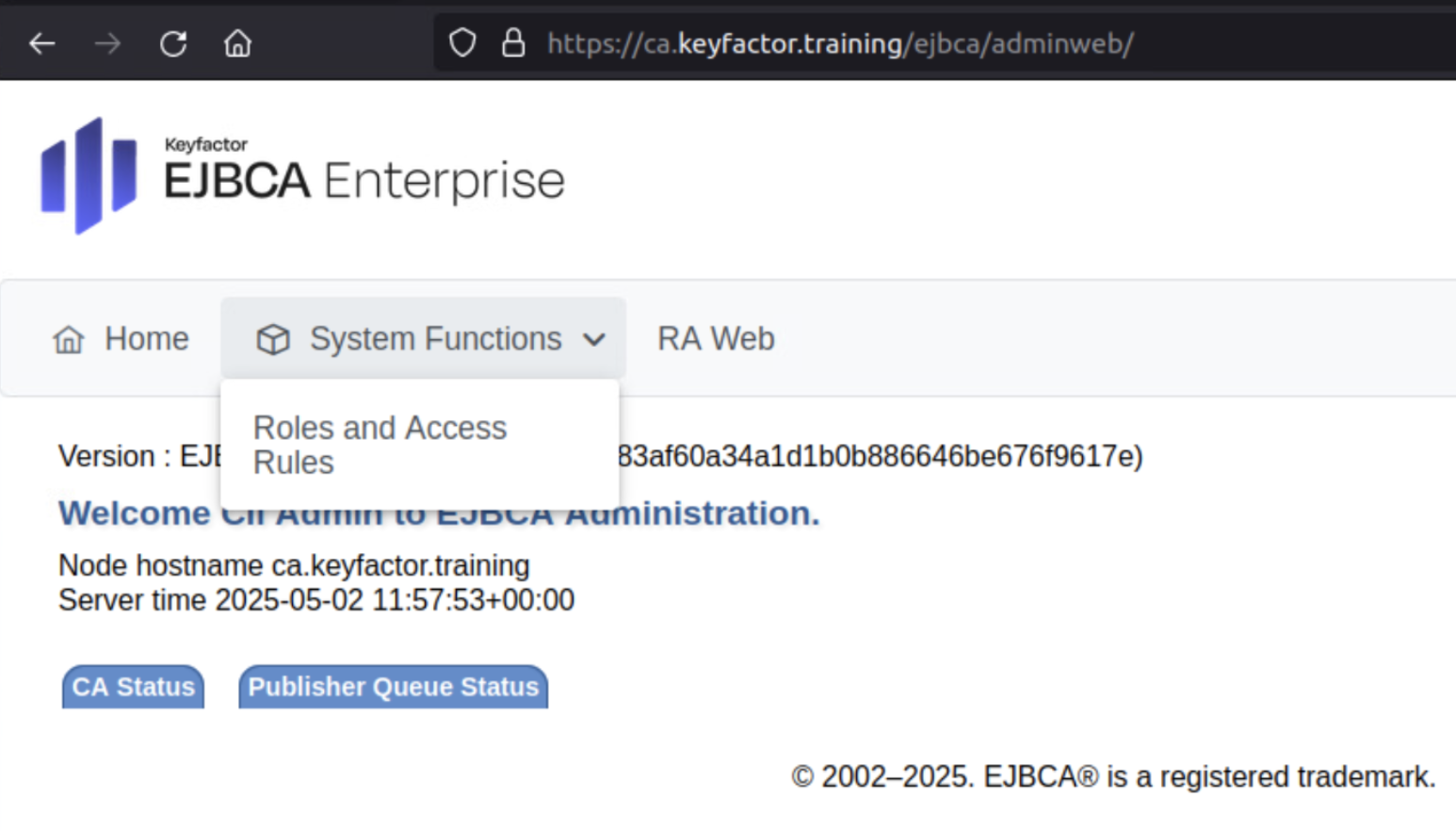
To log in as different administrators open a NEW PRIVATE Window in Firefox, or the browser you are working with. A private window allows you to login as a different user from the main browser window. To login using a PRIVATE window in Firefox, select File >> New Private window, and select the URL below
Open New Private Window and access Admin Web on the CA, the URL is:
Select cli_admin from the certificate list
The cli_admin will have limited access to AdminWeb, and full access to RAWeb. This access is constrained by adding the cli_admin to the Training Custom Role above. The Training Custom Role has limited capabilities.

? Question and Answers ?